

TAT7 case keeps your iPhone camera clicking underwater
By Ben Coxworth
March 30, 2012
The TAT7 iPhone Scuba Case, with a photo taken using it
Image Gallery (3 images)There was a time, back in the days of film cameras, when the only ways of getting underwater photos were to buy an expensive waterproof SLR, an expensive waterproof housing for a regular SLR, or a cheap disposable waterproof camera that took horrible shots. Now, all you have to do is buy a housing like the TAT7 iPhone Scuba Case, and start snapping high-res pics – assuming you’ve got the phone to go with it.
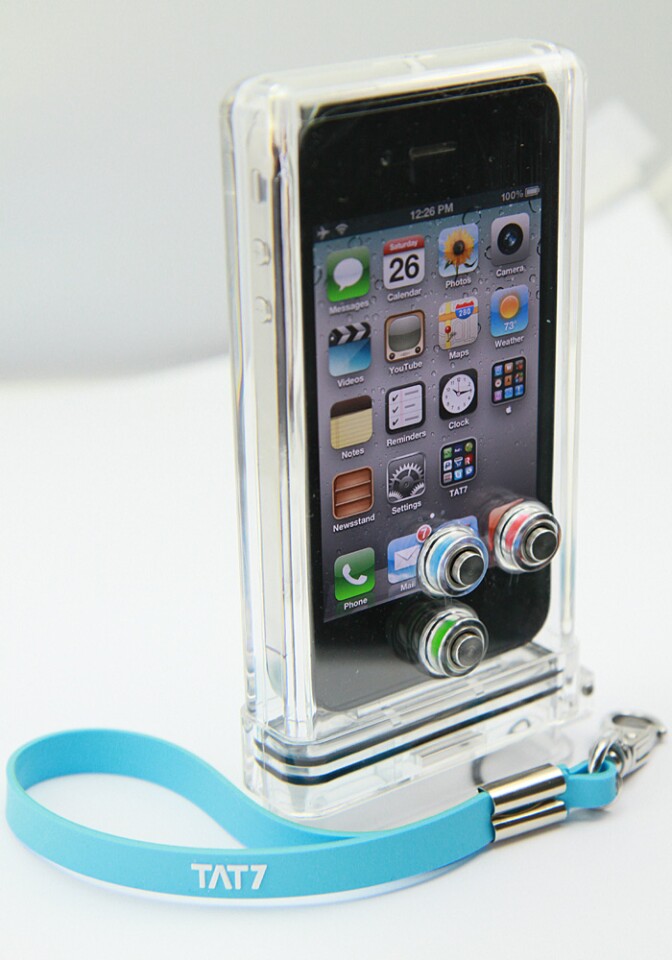
The TAT7 is made from clear polycarbonate, and has a hinged opening on the bottom. Double gaskets on that opening help keep the water out once the phone has been slid in, down to a maximum depth of 30 meters (100 ft). Three buttons on the back allow users to access basic touchscreen photo and video controls – if you’re looking for a housing that will let you Tweet from the briny depths, look elsewhere.
It’s available now, for US$84.95.
Undersea iPhone photographers looking for something a little more substantial might want to check out the dual-handled FourPro.

An experienced freelance writer, videographer and television producer, Ben's interest in all forms of innovation is particularly fanatical when it comes to human-powered transportation, film-making gear, environmentally-friendly technologies and anything that's designed to go underwater. He lives in Edmonton, Alberta, where he spends a lot of time going over the handlebars of his mountain bike, hanging out in off-leash parks, and wishing the Pacific Ocean wasn't so far away. All articles by Ben Coxworth
Or Login with Facebook:
Just enter your friends and your email address into the form below
For multiple addresses, separate each with a comma
Privacy is safe with us because we have a strict privacy policy.

Do not buy this case if you have iOS 5.1 on your iPhone. This case needs the 'double-click' to unlock the camera app (which was on iOS 5.0 and 5.0.1), but has been replaced with a 'slide' unlock.
Also, their contact form also does not function, only tells you: "Sorry, we have encountered some errors here."
In their FAQ they simply tell you to de-activate the sleep mode and move the camera to the postion of the music app. Your battery life will love this (NOT).
Jetse1st May, 2012 @ 12:04 pm PDT